
Chrome side panel · Version 1.0.0
See what a Shopify store runs on. Export its products in one click.
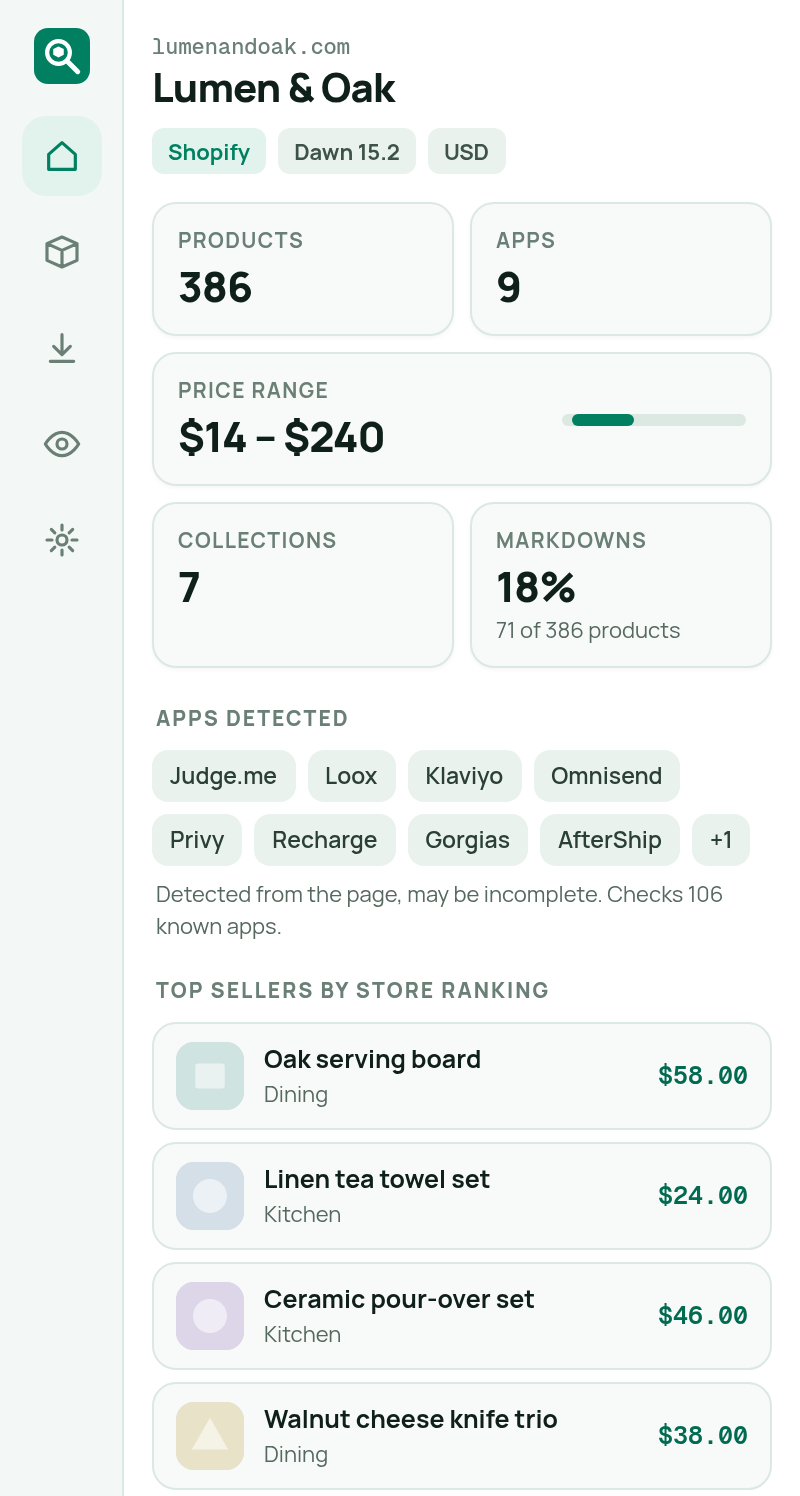
Open any Shopify store and the side panel shows its theme, apps, top sellers by store ranking and price range. Export the catalog as a Shopify CSV, or track the store and see when prices drop.
Needs Chrome 116 or later. Shows snapshots and estimates, never real sales.
What it shows
A clear read of any store, right beside the page
Everything below comes from pages the store already makes public. Nothing here needs a login or access to the store’s admin.
Theme and version
Reads the theme name and version that the store publishes on its pages.
Apps from the page
Lists the apps whose scripts load on the storefront. Apps that leave no trace on the page cannot be seen.
Top sellers by store ranking
Shows the order the store uses when it ranks its own products. It is a ranking, not a sales count.
Latest products
The most recently added products, each with its image and price.
Price range
The lowest and highest price in the catalog, in the store’s currency.
Markdowns
Products priced below their compare-at price, with the percentage off.
Pixel IDs
The ad pixel IDs found on the page, so you can see which accounts a store measures with.
Ad library link
One click opens the Meta Ad Library search for the store in another tab.
Export
Export in 3 steps
- 01
Open a store
Visit any Shopify store in Chrome and open the side panel. The overview loads from the store’s public pages.
- 02
Choose scope and format
Decide how much of the catalog to export, then pick Shopify CSV, generic CSV, JSON or an images ZIP.
- 03
Save
Click Export and save the file. The file is built in your browser and is not uploaded anywhere.
Shopify CSV
Uses the column layout of the Shopify product importer.
Generic CSV
Plain columns that open cleanly in any spreadsheet.
JSON
The full product data, ready for your own scripts.
Images ZIP
The product images collected in one ZIP file.
Shopify CSV columns
34 columns, in this order
Handle, Title, Body (HTML), Vendor, Product Category, Type, Tags, Published, Option1 Name, Option1 Value, Option2 Name, Option2 Value, Option3 Name, Option3 Value, Variant SKU, Variant Grams, Variant Inventory Tracker, Variant Inventory Qty, Variant Inventory Policy, Variant Fulfillment Service, Variant Price, Variant Compare At Price, Variant Requires Shipping, Variant Taxable, Variant Barcode, Image Src, Image Position, Image Alt Text, Gift Card, SEO Title, SEO Description, Variant Image, Variant Weight Unit, Status
One run exports up to 1,000 products.
Track stores
Follow a store and see what changed
Add a store to the tracker and the extension takes one snapshot a day. The change log then lists price drops, products added, products sold out and products back in stock.
- Track up to 10 stores
- One snapshot a day, no extra setup
- Notifications are opt-in
- Snapshots and estimates, never real sales
Change log
Example- Price dropOak serving board$64.00 to $58.00Today
- AddedWalnut spice rack$38.00Today
- Sold outLinen tea towel setAll variantsYesterday
- Back in stockCeramic pour-over set$46.00Yesterday
Sample data. Changes are kept for 30 days.
Privacy
Your research stays on your computer
The extension runs in your browser and has no server of ours behind it. It contacts only the stores you open or track.
Runs in your browser
Reading, exporting and tracking all happen inside Chrome on your computer.
No server of ours
There is no backend. Nothing you view or export is sent to us.
No analytics
No tracking scripts, no usage counters and no advertising code.
Only your stores
The extension contacts only the stores you open or choose to track.
FAQ
Questions people ask
Does it show real sales?
No. The extension has no access to a store’s orders or revenue. Top sellers follow the order the store itself uses, and everything in the tracker is a snapshot or an estimate taken from public pages.
Is it private?
Yes. Your recent stores, tracked snapshots and settings stay in your browser. There is no server of ours and no analytics. The extension only contacts the stores you open or track.
How do I import the CSV into my store?
In your Shopify admin, open Products and choose Import. Select the Shopify CSV you exported, review the preview and confirm. Only import products you have the right to sell.
Does it work on every Shopify store?
It works on stores that keep their public product data available. Some stores limit it or sit behind a password page. In that case the panel shows what it could read and tells you what is missing.
Is it affiliated with Shopify or Meta?
No. This is an independent extension. The names Shopify and Meta are used only to describe what it works with.
How many products can I export?
Up to 1,000 products in one run. For larger catalogs, export in several runs.
Which languages does it support?
The side panel is available in 15 languages. It uses your Chrome language when it is one of them and English otherwise.
Which version of Chrome do I need?
Chrome 116 or later, because the extension lives in the Chrome side panel.
Open a store and see it in the side panel
Add the extension to Chrome, visit a Shopify store and open the panel.